
Redémarrer un Service en PowerShell


Redémarrer un Service en PowerShell kb  Windows Scripting powershell Administration

Je vous propose dans ce tutoriel de redémarrer un service Windows, local ou distant, en Powershell.
Redémarrer un Service en PowerShell kb  Windows Scripting powershell Administration

Redémarrer un service local

Je redémarre ici le service Client DNS


Restart-Service "Client DNS"

Pour certains services il est nécessaire de forcer le redémarrage en ajoutant le paramètre -force


Restart-Service spooler -force

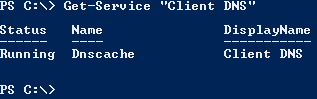
Connaître l’état de fonctionnement d’un service

Si vous souhaitez savoir dans quel état est un service il suffit d’exécuter la commande suivante:


Restart-Service "Client DNS"

Redémarrer un Service en PowerShell kb  Windows Scripting powershell Administration

Redémarrer un service sur un serveur distant

Pour redémarrer un service d’un serveur distant il est nécessaire d’utiliser la commande Invoke-Command. Dans cet exemple je redémarre le service Client DNS du serveur NomDuServeur


Invoke-Command {Restart-Service "Client DNS" -passthru} -ComputerName "NomDuServeur"

Partagez cet article avec vos amis

Vous avez aimé cet article ? N'hésitez pas à le partager avec vos amis en cliquant sur les boutons ci-dessous :

  • Redémarrer un Service en PowerShell kb  Windows Scripting powershell Administration
  • Redémarrer un Service en PowerShell kb  Windows Scripting powershell Administration
  • Redémarrer un Service en PowerShell kb  Windows Scripting powershell Administration
  • Redémarrer un Service en PowerShell kb  Windows Scripting powershell Administration
  • Redémarrer un Service en PowerShell kb  Windows Scripting powershell Administration
  • Redémarrer un Service en PowerShell kb  Windows Scripting powershell Administration
  • Redémarrer un Service en PowerShell kb  Windows Scripting powershell Administration
  • Redémarrer un Service en PowerShell kb  Windows Scripting powershell Administration
  • Redémarrer un Service en PowerShell kb  Windows Scripting powershell Administration
  • Redémarrer un Service en PowerShell kb  Windows Scripting powershell Administration
  • Redémarrer un Service en PowerShell kb  Windows Scripting powershell Administration
  • Redémarrer un Service en PowerShell kb  Windows Scripting powershell Administration

  • Mawo

    au second tuto il y a :
    Restart-Service “Client DNS”
    alors qu’il devrait y avoir Get-Service “Client DNS”