Posts tagged ‘Windows XP’

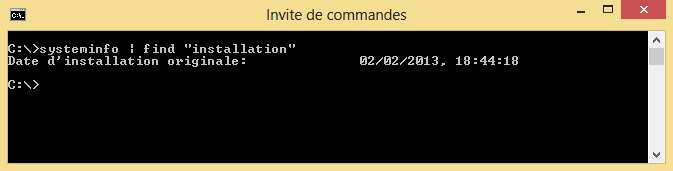
Retrouver la date d’installation de Windows sur un ordinateur

Retrouver la date dinstallation de Windows sur un ordinateur kb  Windows XP Windows Vista Windows 8 Windows 7 Scripting

Je vous propose dans ce tutoriel une petite commande a exécuter depuis une invite de commande permettant de retrouver la date d’installation de votre distribution de Windows.

lire la suite…

Partagez cet article avec vos amis

Vous avez aimé cet article ? N'hésitez pas à le partager avec vos amis en cliquant sur les boutons ci-dessous :

  • Retrouver la date dinstallation de Windows sur un ordinateur kb  Windows XP Windows Vista Windows 8 Windows 7 Scripting
  • Retrouver la date dinstallation de Windows sur un ordinateur kb  Windows XP Windows Vista Windows 8 Windows 7 Scripting
  • Retrouver la date dinstallation de Windows sur un ordinateur kb  Windows XP Windows Vista Windows 8 Windows 7 Scripting
  • Retrouver la date dinstallation de Windows sur un ordinateur kb  Windows XP Windows Vista Windows 8 Windows 7 Scripting
  • Retrouver la date dinstallation de Windows sur un ordinateur kb  Windows XP Windows Vista Windows 8 Windows 7 Scripting
  • Retrouver la date dinstallation de Windows sur un ordinateur kb  Windows XP Windows Vista Windows 8 Windows 7 Scripting
  • Retrouver la date dinstallation de Windows sur un ordinateur kb  Windows XP Windows Vista Windows 8 Windows 7 Scripting
  • Retrouver la date dinstallation de Windows sur un ordinateur kb  Windows XP Windows Vista Windows 8 Windows 7 Scripting
  • Retrouver la date dinstallation de Windows sur un ordinateur kb  Windows XP Windows Vista Windows 8 Windows 7 Scripting
  • Retrouver la date dinstallation de Windows sur un ordinateur kb  Windows XP Windows Vista Windows 8 Windows 7 Scripting
  • Retrouver la date dinstallation de Windows sur un ordinateur kb  Windows XP Windows Vista Windows 8 Windows 7 Scripting
  • Retrouver la date dinstallation de Windows sur un ordinateur kb  Windows XP Windows Vista Windows 8 Windows 7 Scripting

Lente progression de Windows 8 sur le marché des systèmes d’exploitation

Lente progression de Windows 8 sur le marché des systèmes dexploitation news kb  Windows XP Windows 8 Windows 7 Microsoft

Comme l’indique ce graphique issu de netmarketshare.com, le taux de pénétration de Windows 8 est plutôt mitigé : 2,79% de tous les systèmes d’exploitation Windows. Il semble que Windows XP et Windows 7 aient encore de beaux jours devant eux et qu’il ne semble pas judicieux, pour le petit blogueur que je suis, d’abandonner trop vite les tutoriels les concernant …

Windows 8 now up to 2.79% market share as Windows 7 stabilizes after its first decline | The Next Web


Partagez cet article avec vos amis

Vous avez aimé cet article ? N'hésitez pas à le partager avec vos amis en cliquant sur les boutons ci-dessous :

  • Lente progression de Windows 8 sur le marché des systèmes dexploitation news kb  Windows XP Windows 8 Windows 7 Microsoft
  • Lente progression de Windows 8 sur le marché des systèmes dexploitation news kb  Windows XP Windows 8 Windows 7 Microsoft
  • Lente progression de Windows 8 sur le marché des systèmes dexploitation news kb  Windows XP Windows 8 Windows 7 Microsoft
  • Lente progression de Windows 8 sur le marché des systèmes dexploitation news kb  Windows XP Windows 8 Windows 7 Microsoft
  • Lente progression de Windows 8 sur le marché des systèmes dexploitation news kb  Windows XP Windows 8 Windows 7 Microsoft
  • Lente progression de Windows 8 sur le marché des systèmes dexploitation news kb  Windows XP Windows 8 Windows 7 Microsoft
  • Lente progression de Windows 8 sur le marché des systèmes dexploitation news kb  Windows XP Windows 8 Windows 7 Microsoft
  • Lente progression de Windows 8 sur le marché des systèmes dexploitation news kb  Windows XP Windows 8 Windows 7 Microsoft
  • Lente progression de Windows 8 sur le marché des systèmes dexploitation news kb  Windows XP Windows 8 Windows 7 Microsoft
  • Lente progression de Windows 8 sur le marché des systèmes dexploitation news kb  Windows XP Windows 8 Windows 7 Microsoft
  • Lente progression de Windows 8 sur le marché des systèmes dexploitation news kb  Windows XP Windows 8 Windows 7 Microsoft
  • Lente progression de Windows 8 sur le marché des systèmes dexploitation news kb  Windows XP Windows 8 Windows 7 Microsoft

Vérifier la version du client Remote Desktop Connection (RDP)

Nous allons voir dans cet article comment retrouver simplement la version d’un client RDP installé sur un ordinateur.

lire la suite…

Partagez cet article avec vos amis

Vous avez aimé cet article ? N'hésitez pas à le partager avec vos amis en cliquant sur les boutons ci-dessous :

  • Vérifier la version du client Remote Desktop Connection (RDP) kb  Windows XP Windows Vista Windows Server 2008 Windows Server 2003 Windows 7 Terminal Services RemoteFX Remote Destop RDP Citrix
  • Vérifier la version du client Remote Desktop Connection (RDP) kb  Windows XP Windows Vista Windows Server 2008 Windows Server 2003 Windows 7 Terminal Services RemoteFX Remote Destop RDP Citrix
  • Vérifier la version du client Remote Desktop Connection (RDP) kb  Windows XP Windows Vista Windows Server 2008 Windows Server 2003 Windows 7 Terminal Services RemoteFX Remote Destop RDP Citrix
  • Vérifier la version du client Remote Desktop Connection (RDP) kb  Windows XP Windows Vista Windows Server 2008 Windows Server 2003 Windows 7 Terminal Services RemoteFX Remote Destop RDP Citrix
  • Vérifier la version du client Remote Desktop Connection (RDP) kb  Windows XP Windows Vista Windows Server 2008 Windows Server 2003 Windows 7 Terminal Services RemoteFX Remote Destop RDP Citrix
  • Vérifier la version du client Remote Desktop Connection (RDP) kb  Windows XP Windows Vista Windows Server 2008 Windows Server 2003 Windows 7 Terminal Services RemoteFX Remote Destop RDP Citrix
  • Vérifier la version du client Remote Desktop Connection (RDP) kb  Windows XP Windows Vista Windows Server 2008 Windows Server 2003 Windows 7 Terminal Services RemoteFX Remote Destop RDP Citrix
  • Vérifier la version du client Remote Desktop Connection (RDP) kb  Windows XP Windows Vista Windows Server 2008 Windows Server 2003 Windows 7 Terminal Services RemoteFX Remote Destop RDP Citrix
  • Vérifier la version du client Remote Desktop Connection (RDP) kb  Windows XP Windows Vista Windows Server 2008 Windows Server 2003 Windows 7 Terminal Services RemoteFX Remote Destop RDP Citrix
  • Vérifier la version du client Remote Desktop Connection (RDP) kb  Windows XP Windows Vista Windows Server 2008 Windows Server 2003 Windows 7 Terminal Services RemoteFX Remote Destop RDP Citrix
  • Vérifier la version du client Remote Desktop Connection (RDP) kb  Windows XP Windows Vista Windows Server 2008 Windows Server 2003 Windows 7 Terminal Services RemoteFX Remote Destop RDP Citrix
  • Vérifier la version du client Remote Desktop Connection (RDP) kb  Windows XP Windows Vista Windows Server 2008 Windows Server 2003 Windows 7 Terminal Services RemoteFX Remote Destop RDP Citrix

Comment installer .NET Framework 3.5 sur un ordinateur sans connection Internet

On pourrait tout à fait penser qu’il suffit de télécharger le package complet du .NET Framework 3.5 plutôt que le programme d’amorçage pour pouvoir l’installer sur un serveur Windows sans accès à Internet … et bien non car le programme va tenter de télécharger le language pack correspondant à sa localisation et l’installation va échouer.

lire la suite…

Partagez cet article avec vos amis

Vous avez aimé cet article ? N'hésitez pas à le partager avec vos amis en cliquant sur les boutons ci-dessous :

  • Comment installer .NET Framework 3.5 sur un ordinateur sans connection Internet kb  Windows XP Windows Vista Windows Server 2008 Windows Server 2003 Windows 7 troubleshooting Installation framework
  • Comment installer .NET Framework 3.5 sur un ordinateur sans connection Internet kb  Windows XP Windows Vista Windows Server 2008 Windows Server 2003 Windows 7 troubleshooting Installation framework
  • Comment installer .NET Framework 3.5 sur un ordinateur sans connection Internet kb  Windows XP Windows Vista Windows Server 2008 Windows Server 2003 Windows 7 troubleshooting Installation framework
  • Comment installer .NET Framework 3.5 sur un ordinateur sans connection Internet kb  Windows XP Windows Vista Windows Server 2008 Windows Server 2003 Windows 7 troubleshooting Installation framework
  • Comment installer .NET Framework 3.5 sur un ordinateur sans connection Internet kb  Windows XP Windows Vista Windows Server 2008 Windows Server 2003 Windows 7 troubleshooting Installation framework
  • Comment installer .NET Framework 3.5 sur un ordinateur sans connection Internet kb  Windows XP Windows Vista Windows Server 2008 Windows Server 2003 Windows 7 troubleshooting Installation framework
  • Comment installer .NET Framework 3.5 sur un ordinateur sans connection Internet kb  Windows XP Windows Vista Windows Server 2008 Windows Server 2003 Windows 7 troubleshooting Installation framework
  • Comment installer .NET Framework 3.5 sur un ordinateur sans connection Internet kb  Windows XP Windows Vista Windows Server 2008 Windows Server 2003 Windows 7 troubleshooting Installation framework
  • Comment installer .NET Framework 3.5 sur un ordinateur sans connection Internet kb  Windows XP Windows Vista Windows Server 2008 Windows Server 2003 Windows 7 troubleshooting Installation framework
  • Comment installer .NET Framework 3.5 sur un ordinateur sans connection Internet kb  Windows XP Windows Vista Windows Server 2008 Windows Server 2003 Windows 7 troubleshooting Installation framework
  • Comment installer .NET Framework 3.5 sur un ordinateur sans connection Internet kb  Windows XP Windows Vista Windows Server 2008 Windows Server 2003 Windows 7 troubleshooting Installation framework
  • Comment installer .NET Framework 3.5 sur un ordinateur sans connection Internet kb  Windows XP Windows Vista Windows Server 2008 Windows Server 2003 Windows 7 troubleshooting Installation framework

Créer une tâche “AT” (les doigts dans le nez)

On le sait, créer une tâche AT n’est pas toujours simple et les réfractaires à la ligne de commande en savent quelque chose. Je n’en paramètre pas tout les jours et pour moi (j’ai une mémoire de poisson rouge) c’est la syntaxe que j’oublie, surtout l’abréviation les jours de la semaine en anglais …

lire la suite…

Partagez cet article avec vos amis

Vous avez aimé cet article ? N'hésitez pas à le partager avec vos amis en cliquant sur les boutons ci-dessous :

  • Créer une tâche “AT” (les doigts dans le nez) kb  Windows XP Windows Vista Windows Server 2008 Windows Server 2003 Windows 7 Tâches AT HTA
  • Créer une tâche “AT” (les doigts dans le nez) kb  Windows XP Windows Vista Windows Server 2008 Windows Server 2003 Windows 7 Tâches AT HTA
  • Créer une tâche “AT” (les doigts dans le nez) kb  Windows XP Windows Vista Windows Server 2008 Windows Server 2003 Windows 7 Tâches AT HTA
  • Créer une tâche “AT” (les doigts dans le nez) kb  Windows XP Windows Vista Windows Server 2008 Windows Server 2003 Windows 7 Tâches AT HTA
  • Créer une tâche “AT” (les doigts dans le nez) kb  Windows XP Windows Vista Windows Server 2008 Windows Server 2003 Windows 7 Tâches AT HTA
  • Créer une tâche “AT” (les doigts dans le nez) kb  Windows XP Windows Vista Windows Server 2008 Windows Server 2003 Windows 7 Tâches AT HTA
  • Créer une tâche “AT” (les doigts dans le nez) kb  Windows XP Windows Vista Windows Server 2008 Windows Server 2003 Windows 7 Tâches AT HTA
  • Créer une tâche “AT” (les doigts dans le nez) kb  Windows XP Windows Vista Windows Server 2008 Windows Server 2003 Windows 7 Tâches AT HTA
  • Créer une tâche “AT” (les doigts dans le nez) kb  Windows XP Windows Vista Windows Server 2008 Windows Server 2003 Windows 7 Tâches AT HTA
  • Créer une tâche “AT” (les doigts dans le nez) kb  Windows XP Windows Vista Windows Server 2008 Windows Server 2003 Windows 7 Tâches AT HTA
  • Créer une tâche “AT” (les doigts dans le nez) kb  Windows XP Windows Vista Windows Server 2008 Windows Server 2003 Windows 7 Tâches AT HTA
  • Créer une tâche “AT” (les doigts dans le nez) kb  Windows XP Windows Vista Windows Server 2008 Windows Server 2003 Windows 7 Tâches AT HTA

Utiliser le client Terminal Server en ligne de commande

L’utilisation du client Terminal Server mstsc.exe en ligne de commande peut s’avérer très utile dans certaines situations. Je vous propose de le découvrir à travers quelques exemples pratiques.
lire la suite…

Partagez cet article avec vos amis

Vous avez aimé cet article ? N'hésitez pas à le partager avec vos amis en cliquant sur les boutons ci-dessous :

  • Utiliser le client Terminal Server en ligne de commande kb  Windows XP Windows Vista Windows Server 2008 Windows Server 2003 Windows 7 Terminal Server Scripting ligne de commande
  • Utiliser le client Terminal Server en ligne de commande kb  Windows XP Windows Vista Windows Server 2008 Windows Server 2003 Windows 7 Terminal Server Scripting ligne de commande
  • Utiliser le client Terminal Server en ligne de commande kb  Windows XP Windows Vista Windows Server 2008 Windows Server 2003 Windows 7 Terminal Server Scripting ligne de commande
  • Utiliser le client Terminal Server en ligne de commande kb  Windows XP Windows Vista Windows Server 2008 Windows Server 2003 Windows 7 Terminal Server Scripting ligne de commande
  • Utiliser le client Terminal Server en ligne de commande kb  Windows XP Windows Vista Windows Server 2008 Windows Server 2003 Windows 7 Terminal Server Scripting ligne de commande
  • Utiliser le client Terminal Server en ligne de commande kb  Windows XP Windows Vista Windows Server 2008 Windows Server 2003 Windows 7 Terminal Server Scripting ligne de commande
  • Utiliser le client Terminal Server en ligne de commande kb  Windows XP Windows Vista Windows Server 2008 Windows Server 2003 Windows 7 Terminal Server Scripting ligne de commande
  • Utiliser le client Terminal Server en ligne de commande kb  Windows XP Windows Vista Windows Server 2008 Windows Server 2003 Windows 7 Terminal Server Scripting ligne de commande
  • Utiliser le client Terminal Server en ligne de commande kb  Windows XP Windows Vista Windows Server 2008 Windows Server 2003 Windows 7 Terminal Server Scripting ligne de commande
  • Utiliser le client Terminal Server en ligne de commande kb  Windows XP Windows Vista Windows Server 2008 Windows Server 2003 Windows 7 Terminal Server Scripting ligne de commande
  • Utiliser le client Terminal Server en ligne de commande kb  Windows XP Windows Vista Windows Server 2008 Windows Server 2003 Windows 7 Terminal Server Scripting ligne de commande
  • Utiliser le client Terminal Server en ligne de commande kb  Windows XP Windows Vista Windows Server 2008 Windows Server 2003 Windows 7 Terminal Server Scripting ligne de commande

Comment actualiser une GPO à distance

Lorsque l’on souhaite actualiser la stratégie de groupe appliquée à une machine il suffit d’exécuter la commande gpupdate /force depuis une invite de commande de la machine. La tâche n’est malheureusement pas aussi simple lorsqu’il s’agit d’actualiser les stratégies de groupe sur une ou plusieurs machines distantes.

lire la suite…

Partagez cet article avec vos amis

Vous avez aimé cet article ? N'hésitez pas à le partager avec vos amis en cliquant sur les boutons ci-dessous :

  • Comment actualiser une GPO à distance kb  Windows XP Windows Vista Windows Server 2008 Windows Server 2003 Windows 7 Scripting Remote GPO Active Directory
  • Comment actualiser une GPO à distance kb  Windows XP Windows Vista Windows Server 2008 Windows Server 2003 Windows 7 Scripting Remote GPO Active Directory
  • Comment actualiser une GPO à distance kb  Windows XP Windows Vista Windows Server 2008 Windows Server 2003 Windows 7 Scripting Remote GPO Active Directory
  • Comment actualiser une GPO à distance kb  Windows XP Windows Vista Windows Server 2008 Windows Server 2003 Windows 7 Scripting Remote GPO Active Directory
  • Comment actualiser une GPO à distance kb  Windows XP Windows Vista Windows Server 2008 Windows Server 2003 Windows 7 Scripting Remote GPO Active Directory
  • Comment actualiser une GPO à distance kb  Windows XP Windows Vista Windows Server 2008 Windows Server 2003 Windows 7 Scripting Remote GPO Active Directory
  • Comment actualiser une GPO à distance kb  Windows XP Windows Vista Windows Server 2008 Windows Server 2003 Windows 7 Scripting Remote GPO Active Directory
  • Comment actualiser une GPO à distance kb  Windows XP Windows Vista Windows Server 2008 Windows Server 2003 Windows 7 Scripting Remote GPO Active Directory
  • Comment actualiser une GPO à distance kb  Windows XP Windows Vista Windows Server 2008 Windows Server 2003 Windows 7 Scripting Remote GPO Active Directory
  • Comment actualiser une GPO à distance kb  Windows XP Windows Vista Windows Server 2008 Windows Server 2003 Windows 7 Scripting Remote GPO Active Directory
  • Comment actualiser une GPO à distance kb  Windows XP Windows Vista Windows Server 2008 Windows Server 2003 Windows 7 Scripting Remote GPO Active Directory
  • Comment actualiser une GPO à distance kb  Windows XP Windows Vista Windows Server 2008 Windows Server 2003 Windows 7 Scripting Remote GPO Active Directory

7 gestionnaires de connexions RDP

L’administration des systèmes Windows vous amène forcément à vous connecter à distance sur des serveurs, et ceux plusieurs fois par jour. Taper le nom du serveur, son login et son mot de passe devenant vite assez lassant, je vous propose une liste de 7 outils de gestion de connexions RDP qui vous feront gagner beaucoup de temps.

lire la suite…

Partagez cet article avec vos amis

Vous avez aimé cet article ? N'hésitez pas à le partager avec vos amis en cliquant sur les boutons ci-dessous :

  • 7 gestionnaires de connexions RDP softs  Windows XP Windows Workstation Windows Vista Windows Server 2008 Windows Server 2003 Windows Server Windows 7 VNC Terminal Server RDP ICA Contrôle à distance Citrix
  • 7 gestionnaires de connexions RDP softs  Windows XP Windows Workstation Windows Vista Windows Server 2008 Windows Server 2003 Windows Server Windows 7 VNC Terminal Server RDP ICA Contrôle à distance Citrix
  • 7 gestionnaires de connexions RDP softs  Windows XP Windows Workstation Windows Vista Windows Server 2008 Windows Server 2003 Windows Server Windows 7 VNC Terminal Server RDP ICA Contrôle à distance Citrix
  • 7 gestionnaires de connexions RDP softs  Windows XP Windows Workstation Windows Vista Windows Server 2008 Windows Server 2003 Windows Server Windows 7 VNC Terminal Server RDP ICA Contrôle à distance Citrix
  • 7 gestionnaires de connexions RDP softs  Windows XP Windows Workstation Windows Vista Windows Server 2008 Windows Server 2003 Windows Server Windows 7 VNC Terminal Server RDP ICA Contrôle à distance Citrix
  • 7 gestionnaires de connexions RDP softs  Windows XP Windows Workstation Windows Vista Windows Server 2008 Windows Server 2003 Windows Server Windows 7 VNC Terminal Server RDP ICA Contrôle à distance Citrix
  • 7 gestionnaires de connexions RDP softs  Windows XP Windows Workstation Windows Vista Windows Server 2008 Windows Server 2003 Windows Server Windows 7 VNC Terminal Server RDP ICA Contrôle à distance Citrix
  • 7 gestionnaires de connexions RDP softs  Windows XP Windows Workstation Windows Vista Windows Server 2008 Windows Server 2003 Windows Server Windows 7 VNC Terminal Server RDP ICA Contrôle à distance Citrix
  • 7 gestionnaires de connexions RDP softs  Windows XP Windows Workstation Windows Vista Windows Server 2008 Windows Server 2003 Windows Server Windows 7 VNC Terminal Server RDP ICA Contrôle à distance Citrix
  • 7 gestionnaires de connexions RDP softs  Windows XP Windows Workstation Windows Vista Windows Server 2008 Windows Server 2003 Windows Server Windows 7 VNC Terminal Server RDP ICA Contrôle à distance Citrix
  • 7 gestionnaires de connexions RDP softs  Windows XP Windows Workstation Windows Vista Windows Server 2008 Windows Server 2003 Windows Server Windows 7 VNC Terminal Server RDP ICA Contrôle à distance Citrix
  • 7 gestionnaires de connexions RDP softs  Windows XP Windows Workstation Windows Vista Windows Server 2008 Windows Server 2003 Windows Server Windows 7 VNC Terminal Server RDP ICA Contrôle à distance Citrix

Comment convertir un fichier Log du Moniteur de Performance Windows

Vous avez collecté pendant plusieurs jours des données avec Perfmon et vous souhaitez maintenant les analyser avec Excel. Au moment de l’importation les données sont inexploitables car vous avez utilisez le format par défaut de Perfmon, un format binaire en .BLG, au lieu d’un format texte en CSV. Pas de panique, il est tout à fait possible de les convertir en quelques secondes …

lire la suite…

Partagez cet article avec vos amis

Vous avez aimé cet article ? N'hésitez pas à le partager avec vos amis en cliquant sur les boutons ci-dessous :

  • Comment convertir un fichier Log du Moniteur de Performance Windows kb  Windows XP Windows Vista Windows Server 2008 Windows Server 2003 Windows 7 troubleshooting Monitoring Import export excel
  • Comment convertir un fichier Log du Moniteur de Performance Windows kb  Windows XP Windows Vista Windows Server 2008 Windows Server 2003 Windows 7 troubleshooting Monitoring Import export excel
  • Comment convertir un fichier Log du Moniteur de Performance Windows kb  Windows XP Windows Vista Windows Server 2008 Windows Server 2003 Windows 7 troubleshooting Monitoring Import export excel
  • Comment convertir un fichier Log du Moniteur de Performance Windows kb  Windows XP Windows Vista Windows Server 2008 Windows Server 2003 Windows 7 troubleshooting Monitoring Import export excel
  • Comment convertir un fichier Log du Moniteur de Performance Windows kb  Windows XP Windows Vista Windows Server 2008 Windows Server 2003 Windows 7 troubleshooting Monitoring Import export excel
  • Comment convertir un fichier Log du Moniteur de Performance Windows kb  Windows XP Windows Vista Windows Server 2008 Windows Server 2003 Windows 7 troubleshooting Monitoring Import export excel
  • Comment convertir un fichier Log du Moniteur de Performance Windows kb  Windows XP Windows Vista Windows Server 2008 Windows Server 2003 Windows 7 troubleshooting Monitoring Import export excel
  • Comment convertir un fichier Log du Moniteur de Performance Windows kb  Windows XP Windows Vista Windows Server 2008 Windows Server 2003 Windows 7 troubleshooting Monitoring Import export excel
  • Comment convertir un fichier Log du Moniteur de Performance Windows kb  Windows XP Windows Vista Windows Server 2008 Windows Server 2003 Windows 7 troubleshooting Monitoring Import export excel
  • Comment convertir un fichier Log du Moniteur de Performance Windows kb  Windows XP Windows Vista Windows Server 2008 Windows Server 2003 Windows 7 troubleshooting Monitoring Import export excel
  • Comment convertir un fichier Log du Moniteur de Performance Windows kb  Windows XP Windows Vista Windows Server 2008 Windows Server 2003 Windows 7 troubleshooting Monitoring Import export excel
  • Comment convertir un fichier Log du Moniteur de Performance Windows kb  Windows XP Windows Vista Windows Server 2008 Windows Server 2003 Windows 7 troubleshooting Monitoring Import export excel

Arrêter ou redémarrer rapidement plusieurs systèmes Windows à distance

Grâce à l’utilisation conjointe des commandes DO et SHUTDOWN proposées nativement dans Windows, il est possible d’arrêter ou de redémarrer à distance une liste d’ordinateurs voir même tous les ordinateurs d’une plage d’adresses IP.
lire la suite…

Partagez cet article avec vos amis

Vous avez aimé cet article ? N'hésitez pas à le partager avec vos amis en cliquant sur les boutons ci-dessous :

  • Arrêter ou redémarrer rapidement plusieurs systèmes Windows à distance kb  Windows XP Windows Vista Windows Server 2008 Windows Server 2003 Windows 7 shutdown Réseau ligne de commande IP Contrôle à distance
  • Arrêter ou redémarrer rapidement plusieurs systèmes Windows à distance kb  Windows XP Windows Vista Windows Server 2008 Windows Server 2003 Windows 7 shutdown Réseau ligne de commande IP Contrôle à distance
  • Arrêter ou redémarrer rapidement plusieurs systèmes Windows à distance kb  Windows XP Windows Vista Windows Server 2008 Windows Server 2003 Windows 7 shutdown Réseau ligne de commande IP Contrôle à distance
  • Arrêter ou redémarrer rapidement plusieurs systèmes Windows à distance kb  Windows XP Windows Vista Windows Server 2008 Windows Server 2003 Windows 7 shutdown Réseau ligne de commande IP Contrôle à distance
  • Arrêter ou redémarrer rapidement plusieurs systèmes Windows à distance kb  Windows XP Windows Vista Windows Server 2008 Windows Server 2003 Windows 7 shutdown Réseau ligne de commande IP Contrôle à distance
  • Arrêter ou redémarrer rapidement plusieurs systèmes Windows à distance kb  Windows XP Windows Vista Windows Server 2008 Windows Server 2003 Windows 7 shutdown Réseau ligne de commande IP Contrôle à distance
  • Arrêter ou redémarrer rapidement plusieurs systèmes Windows à distance kb  Windows XP Windows Vista Windows Server 2008 Windows Server 2003 Windows 7 shutdown Réseau ligne de commande IP Contrôle à distance
  • Arrêter ou redémarrer rapidement plusieurs systèmes Windows à distance kb  Windows XP Windows Vista Windows Server 2008 Windows Server 2003 Windows 7 shutdown Réseau ligne de commande IP Contrôle à distance
  • Arrêter ou redémarrer rapidement plusieurs systèmes Windows à distance kb  Windows XP Windows Vista Windows Server 2008 Windows Server 2003 Windows 7 shutdown Réseau ligne de commande IP Contrôle à distance
  • Arrêter ou redémarrer rapidement plusieurs systèmes Windows à distance kb  Windows XP Windows Vista Windows Server 2008 Windows Server 2003 Windows 7 shutdown Réseau ligne de commande IP Contrôle à distance
  • Arrêter ou redémarrer rapidement plusieurs systèmes Windows à distance kb  Windows XP Windows Vista Windows Server 2008 Windows Server 2003 Windows 7 shutdown Réseau ligne de commande IP Contrôle à distance
  • Arrêter ou redémarrer rapidement plusieurs systèmes Windows à distance kb  Windows XP Windows Vista Windows Server 2008 Windows Server 2003 Windows 7 shutdown Réseau ligne de commande IP Contrôle à distance